
Case study · B2B SaaS · AI for critical infrastructure
From data silos to a new platform
I redesigned the information architecture of an AI-assisted platform for telecom infrastructure owners and their engineers. As the product designer I stayed with it through specification, build, customer testing, launch and migration, and took over a number of product ownership responsibilities.
Role
Product designer, later product owner
Timeline
May to November 2026, concept to launch
Team
CEO, Head of Product,
8 engineers and QA
Status
Launched,
customers are live.
The product
The client’s software reads the document collections of tower owners: leases, permits, structural analyses. It extracts the values that matter and runs AI agents that produce engineering deliverables such as validation reports and drawings.
Their legacy portal had grown one feature at a time. Documents sat in separate data rooms, the AI tools lived in another area and the data model was hard-coded. The interface was hard to use and required training.
How the work ran
01
Discovery
Pain points from Product, Sales and Customer Success, plus recorded customer calls.
02
Concept and IA
A layered platform model, reviewed every week with the CEO and Head of Product.
03
Specification
28 spec pages as the source of truth for engineering and QA.
04
Build review
A UX audit of the build, five internal walkthroughs, design QA at ticket level.
05
Customer sessions
Seven preview sessions with users from four customers.
06
Launch
Customers moved off the legacy portal. Every engineering iteration still gets a design review.
01 · Information architecture
A complaint about data silos became the architecture of the new platform
The problem
Customers' documents were locked into separate data rooms. Nobody could group documents across rooms, point the assistant at a subset, or get from a document to the AI tool working on it. The data model of the legacy platform was not scalable.
What I worked out
Based on the listed pain points, I designed a layered data model. A structured Data Library holds every document once and the assistant is present on every surface. Agents run on a chosen scope, and their saved outputs return to the Data Library as artifacts.
Data Library
Document Intelligence and Extraction Tools
Assets
Intelligent Fields
Folder A
Intelligent Fields
Folder B
Intelligent Fields
Nino
Prominent entry point, persistent across all surfaces
Agent A Run
(i.e. Structural Analysis)
Agent B Run
(i.e. Data Validation)
Agent C Run
(i.e. Mount Analysis)
Artifact A
(i.e. Structural Analysis)
Agents
All available Agents
Workflows
All available workflows
Runs
All current and past runs
Artifact B
(i.e. Data Validation)
Artifact C
(i.e. Mount Analysis)
Interactive data table, extraction tools, CUSTOM VIEWS
CHAT UI
Conversational layer
Agentic conversations with templated outputs
Saved Artifacts become persistent
High-level platform information architecture presented to leadership during early rounds.
The principle
Documents are stored once in a unified data library. Folders, views, projects, permissions and AI scope are all layers on top.
Decisions made
The CEO pushed for an assistant-first experience, as hundreds of users cannot be trained on a complex interface, whereas everyone knows how to type a question.
I made the assistant the entry point and conversations are private, but runs are surfaced across members (i.e. cross-review is needed). Output stays inside its run until someone saves it as an artifact to the Data Library, which is accessible by the whole organisation.
User A
User B
Data Library
User C
User D
INDIVIDUAL USER
NINO CHATS
Individual conversations are not shared across organization
RUNS
Runs are surfaced across the organization, filterable
ARTIFACTS
Outputs are saved to the data library and with this become accessible across org
Nino
Individual conversations
Agent
Run A Started
Artifact
Artifact A Saved
Artifact
Artifact B Saved
Artifact
Artifact C Saved
Artifact
Artifact D Saved
All runs
Nino
Individual conversations
Agent
Run B Started
Nino
Individual conversations
Agent
Run C Started
Nino
Individual conversations
Agent
Run D Started


Simplified role-based architecture.
What testing changed
In the first build, a run lived inside the conversation that started it. Internal walkthroughs showed that people lost track of their runs that way and reviewers could not find a run someone else had started.
Thus runs became the main agent interface: one list with status, author and outputs, and one clear action per state. A run can be started from a conversation or engaged directly.


Re-run

Download outputs


Archive run


Report a problem with this run


AM
Workspace


Agents


Agents

Engage Agent
All status

All Agents

All outputs

All authors


Search


1-10 of 100


25

NAME

Loop Blvd Validation Report
Data Validation · Report
Loop Blvd Validation Report
Data Validation · Report
Loop Blvd Validation Report
Data Validation · Report
Loop Blvd Validation Report

Data Validation · Report
Loop Blvd Validation Report
Data Validation · Report
Loop Blvd Validation Report
Data Validation · Report
Loop Blvd Validation Report
Data Validation · Report
Loop Blvd Validation Report
Data Validation · Report
Loop Blvd Validation Report
Data Validation · Report
Loop Blvd Validation Report
Data Validation · Report
Loop Blvd Validation Report
Data Validation · Report
Loop Blvd Validation Report
Data Validation · Report
Status

Pending

Running · 0:05

Needs review

Completed

Failed

Cancelled

Completed

Completed

Completed

Completed

Completed

Completed
STARTED
-
2 hours ago
2 hours ago
4 hours ago
4 hours ago
4 hours ago
18 hours ago
18 hours ago
18 hours ago
18 hours ago
18 hours ago
18 hours ago
AUTHOR
Henry Smith
Henry Smith
Henry Smith
Deborah Baker
Deborah Baker
Deborah Baker
Xin Li
Xin Li
Xin Li
Xin Li
Xin Li
Xin Li
OUTPUTS
-
-
-
1 / 1 pushed to Data Library
-
-
0 / 1 pushed to Data Library
2 / 2 pushed to Data Library
1 / 1 pushed to Data Library
1 / 2 pushed to Data Library
1 / 1 pushed to Data Library
1 / 1 pushed to Data Library
ACTIONS

Cancel

Cancel


Review inputs


Open canvas


Re-run


Re-run


Open canvas


Open canvas


Open canvas


Open canvas


Open canvas


Open canvas


Runs as the primary interface, with one action per status.
Result
Leadership committed to building a new platform on this model and migrating every customer to it.
"It really demonstrates design vision and a clear understanding of our market and our users."
Head of Product, after the first concept review
02 · User research
Seven customer sessions before launch, and what we changed afterwards
How I set it up
I planned and ran preview sessions with the people who use the legacy product every day. Each one lasted up to an hour and ran on the customer's own data. I asked for each person's role and current usage beforehand, since a lease administrator and a structural engineer need different sessions.
The platform was still in build, and a lot broke live. The conversations were worth it anyway.
Who took part
Property team lead
Tower owner, about 8,000 sites
Property consents specialist
Tower owner, about 8,000 sites
Engineering manager
Structural engineering firm
VP of IT, two sessions
Tower owner, about 1,850 assets
Real estate administrator
Tower portfolio owner
Integrations developer
Tower portfolio owner
The main finding
No customer was running the full setup. Product value was gated by configuration, and many users had stopped after the first or second layer.
1 · Document classes
2 · Document fields
3 · Site fields
4 · Folders
5 · Agents
Each layer builds on the one below. Agents, the most valuable part, were switched on for one customer in six, and two customers had never heard of them.
What we heard and what was changed
Heard in sessions
Changed in the platform
Cloning a field kept a live link, so later edits overwrote each other.
Duplicate now creates an independent copy.
Field columns appear in no useful order, and saving a field throws you back to the top of the list.
Columns can be reordered and grouped. Lists sort by last updated.
Where in the document did this value come from, and how sure is the system?
Every extracted value shows its source, the reasoning and a confidence indicator.
Setting up fields takes several steps through three areas of the product.
One Configuration area in the main navigation, with standard classes and fields switched on by default.
Our document tags feed the folder checks in our own file system.
Tags carry over unchanged in the migration.


Reprocessing options


Export options


Deduplicate files

Add Intelligent Fields


AM
Workspace


Data Library
All Documents


STANDARD VIEWS

All Documents

Assets

Artifacts
INTELLIGENT FOLDERS

Leases

Projects

All Documents
Actions


Upload
Intelligent Fields · Class A

Status

Filter

Search


1-10 of 100


25

Document Name


Document_A.pdf

Document_B.pdf

Document_C.pdf

Document_D.pdf

Document_E.pdf

Document_F.pdf

Document_F.pdf

Document_F.pdf

Document_F.pdf

Document_F.pdf

Document_F.pdf

Document_F.pdf
Matched site
LAMON2118_Green Drive_1A
LAMON2118_Green Drive_1A
LAMON2118_Green Drive_1A
LAMON2118_Green Drive_1A
LAMON2118_Green Drive_1A
LAMON2118_Green Drive_1A
LAMON2118_Green Drive_1A
LAMON2118_Green Drive_1A
LAMON2118_Green Drive_1B
LAMON2118_Green Drive_1B
LAMON2118_Green Drive_1B
LAMON2118_Green Drive_1B
CLASS
Class A
Class A
Class A
Class A
Class A
Class A
Class A
Class A
Class A
Class A
Class A
Class A
lease_expiry_date

31/03/2041

31/03/2041

30/04/2046

31/03/2041

14/06/2038

14/06/2038

30/09/2035

30/09/2035

01/2044

31/12/2039

NA

28/02/2042
rent_amount

$2,450.00 / month

$2,450.00 / month

$2,523.50 / month

$29,400.00 / year

$1,850.00 / month

$1,850.00

$2,100.00 / month

$2,100.00 / month

$3,200.00

$38,400.00 / year

NA

$3,296.00 / month
tenant_entity

Tower Company Towers LLC

NA

Tower Company Towers LLC

New Cingular Wireless PCS, LLC

T-Mobile Northeast LLC

T-Mobile Northeast LLC

Cellco Partnership

Cellco Partnership

Tower Company

Tower Company Towers LLC

NA

Dish Wireless L.L.C.


Extracted values in the documents table, each with a confidence indicator.
"I like that it's an all inclusive place I could go to, to manage and look at the site information."
Engineering manager, structural engineering firm
03 · Feature design and delivery
Document intelligence feature: parity as the minimum requirement, rebuild and improve
The starting point
An intelligent field is a prompt that reads one value out of a document, such as a rent amount, a lease expiry date or an antenna height. Customers run dozens of them across thousands of documents.
What I added
In the legacy portal, fields were scattered over three areas and showed up in different places. I proposed one place to define fields, a clear model of what each field describes, and results that people can check and correct where they already work.

Company


Dashboard

New conversation
Agents

Data Library
Recents
Compare the RFDS against the structural
Find sites missing a current RFDS
Compare the RFDS against the structural
Data Validation LAMON2118
Compare the RFDS against the structural
Mount Analysis LAMON2118
Compare the RFDS against the structural
Data Validation LAMON2118
Compare the RFDS against the structural
Find sites missing a current RFDS
Mount Analysis LAMON2118
Compare the RFDS against the structural
Data Validation LAMON2118
Compare the RFDS against the structural
Mount Analysis LAMON2118
Compare the RFDS against the structural
Data Validation LAMON2118
Compare the RFDS against the structural

Configuration
AM
Adam Miller
Tower Company

Workspace

Configuration


Data Library

Document classes

Intelligent Fields

Intelligent Folders

Document completeness
AGENTS

Tower drawings

Mount analysis
Intelligent Fields
An intelligent field is one value read out of a document or derived across several. What that value describes may be a document, an asset, or a folder.

Extract fields

Import

Link from catalog

Create field
All
Document
Asset
Folder

Search
Showing 125 Intelligent Fields
FIELD
structure_height_ft
tower_type
lease_commencement_date
rent_escalation_pct
order_date
applicant_entity
antenna_centerline_ft

max_capacity_pct

lease_package_complete
lease_expiry_date

landlord_entity
tenant_entity

renewal_option_count

renewal_notice_days

rent_amount

escalation_frequency

memorandum_recorded
site_id
site_name
latitude
longitude
ground_elevation_ft

wind_speed_mph

ice_thickness_in
carrier_name
DESCRIBES
Asset
Asset
Asset
Asset
Document
Document
Document
Document
Folder
Document
Document
Document
Document
Document
Document
Document
Document
Asset
Asset
Asset
Asset
Document
Document
Document
Document
PROMPT
Read the overall structure height above ground line, in feet, from the site data table.
Read the structure type from the site data table. Use the wording on the sheet.
Extract the date the lease term begins. Return ISO format (YYYY-MM-DD).
Extract the recurring rent increase as a percentage. Do not return one-off increases.
Extract the date the FCC issued this Memorandum Opinion and Order.
Extract the name of the entity whose application this order grants.
Read the antenna centreline height above ground, in feet, for each mounted antenna.
Read the maximum structural capacity used under the proposed loading, as a percentage.
Whether every document the lease package requires has been matched to this asset.
Extract the end date of the current term, before any renewal option is exercised.
Extract the legal name of the party granting the lease, exactly as written.
Extract the legal name of the party taking the lease, exactly as written.
Extract the number of renewal terms the tenant may exercise.
Extract the notice period required to exercise a renewal, in days.
Extract the rent payable at commencement, with its currency and the period it covers.
Extract how often the rent escalates, for example annually or every five years.
Whether a memorandum of lease was recorded against title.
The carrier or owner site identifier used across documents for this asset.
The site name as written on the lease and on the structural report.
Decimal latitude of the structure, to five decimal places.
Decimal longitude of the structure, to five decimal places.
Read the ground elevation above sea level, in feet, from the site data table.
Read the design wind speed used in the analysis, in miles per hour.
Read the design ice thickness used in the analysis, in inches.
Extract the carrier the application or lease is for, exactly as written.
LAST UPDATED
12/01/2026
12/01/2026
12/01/2026
04/02/2025
04/02/2025
04/02/2025
19/03/2025
19/03/2025
19/03/2025
02/04/2025
02/04/2025
02/04/2025
17/04/2025
17/04/2025
06/05/2025
06/05/2025
06/05/2025
21/05/2025
21/05/2025
21/05/2025
09/06/2025
09/06/2025
09/06/2025
23/06/2025
23/06/2025


All three kinds of fields on one page.
One page, three scopes
Document, asset and folder fields share one table. A badge says what each field describes.
Fields as their own objects
Fields used to be unnamed data stored on their owner. My design needed them to be linkable, so engineering changed the data model.
Check, edit, lock
Results sit in the documents table with source and confidence. A value someone corrects is locked, so reprocessing cannot overwrite it.
A decision that went against my first proposal
Based on the user research sessions, we moved forward and defined standard classes and fields. This resulted in the question of what should happen when a customer edits one?
I first proposed overrides per property with version control, so customers would keep receiving our updates. The Head of Product preferred a simpler rule: editing a standard creates a custom copy.
I spelled out the cost before we agreed: The proposed solution is the simpler one, but a customer who edits a standard stops receiving our improvements to it. We dropped version control, and the edit screen now says so in one sentence before the user saves.


AM
Workspace


Configuration


Data Library

Document classes

Intelligent Fields

Intelligent Folders

Document completeness
AGENTS

Tower drawings

Mount analysis

Intelligent Fields
earliest_expiry
Folder field
Define what this field reads out of documents and check the values it produced.

Changes save automatically. Click Extract to update this field's values. Until then, it keeps the values read with the previous prompt.
Field definition
Edit the name and prompt.

Extract
Done
Name
earliest_expiry
Describes
Folder
Folder
The intelligent folder this field is defined on
Site documents / Lease package
Prompt
How the value is read across the documents this folder holds for a site.
Find the earliest date on which any part of the lease arrangement for this site expires.
Read the expiry date from the lease and from every amendment the folder holds for the site. Where an amendment extends or shortens the term, the amended date replaces the original.
Return the date in ISO format (YYYY-MM-DD) and name the document it came from.
Do not return:
• Renewal option dates that have not been exercised
• Expiry dates of agreements that were later terminated


AI rewrite

Undo
Scope
What one value covers.
One value per site, read across every document the folder holds for that site. A site with no documents in the folder has no value.
A banner states the trade-off, when saving and unlinking a standard.
Getting it built correctly
Tickets with acceptance criteria
I wrote the tickets for the frontend team, covering read and edit states to the exact copy.
Answers in the thread
QA and engineers asked about bulk actions, sorting and sharing scope. Answered in the ticket.
Testing every build
I tested each release against the design and sent corrections until they matched.
04 · End-to-end process
One agent, from discovery to a shipped workflow
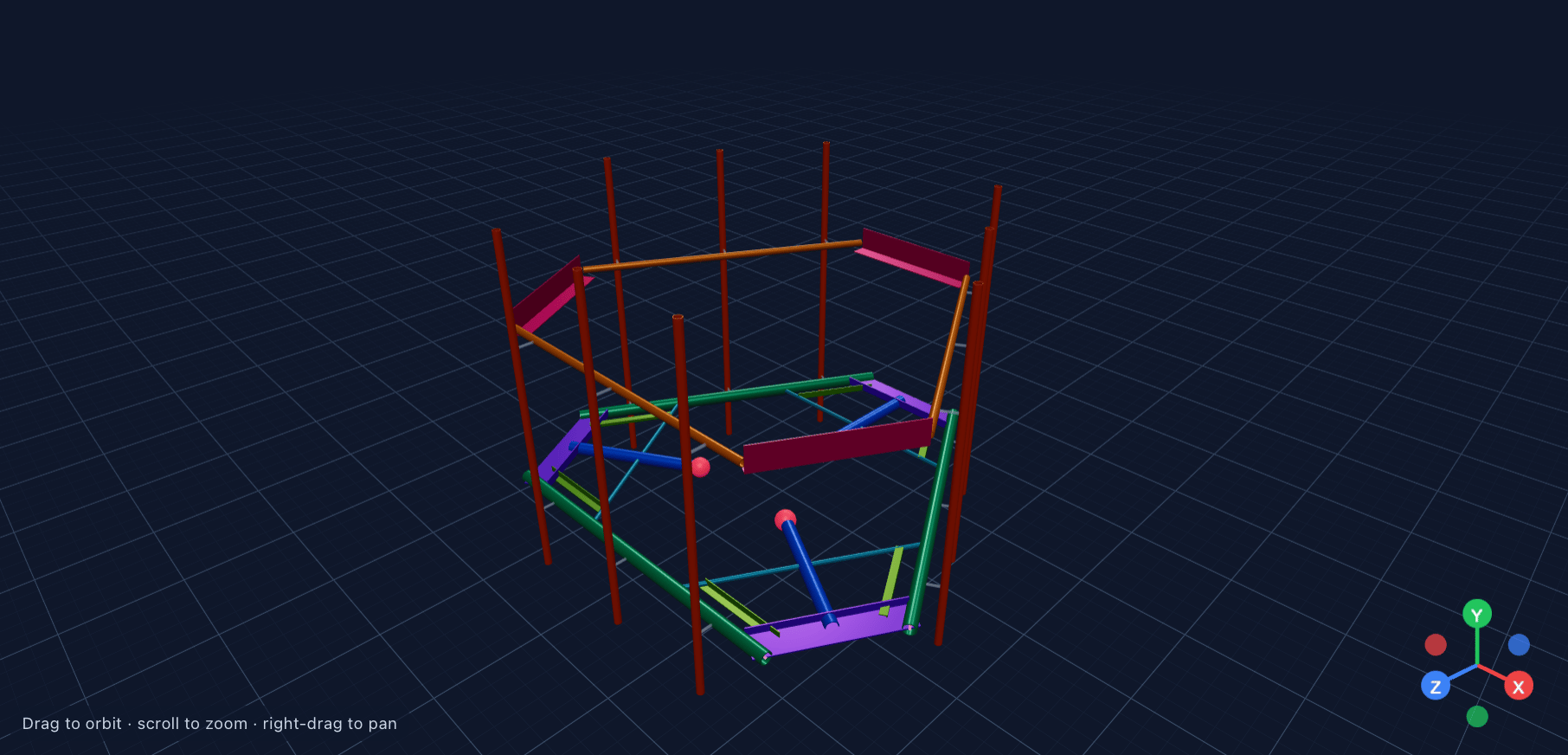
An agent takes a site's documents and produces an engineering deliverable. Mount analysis is the most demanding one: a licensed engineer stamps and signs the result. This is how one agent moved through the building process.
Step 1
Product discovery
Discovery surfaced two requirements. Engineers need to see every assumption before they put their name on a report. Leadership's worry was adoption: if the agent asks for too much manual input, engineers stay with the analysis tool they already know.
Those two requirements pull in different directions, and the design had to satisfy both.
Requirements I took into design
Fill inputs in for the engineer
Read them from the site's documents and ask only for what is missing.
Show where each value comes from
Every input traces back to a document the engineer can open.
Confirm before generating
A person checks the inputs. Detailed inspection stays available as an advanced option.
Step 2
UX draft
Every agent shares one outer experience, so learning one teaches you the rest. A run starts in two steps. The Start button stays disabled until the required inputs are present, so a long run cannot fail halfway over a missing file.
A run can start from the agent list, from a selection of documents or from a conversation. All three lead to the same run.
Engage an Agent
Hand off multi-step work to an AI Agent. It runs on your workspace files and brings results back for review.

ENGINEERING
Data Validation
Cross-checks values across all documents for a site
IN
OUT
Any asset documents
Validation report · PDF

Report
Start
Structural Model
Runs tower structural analysis against current loading
IN
OUT
Modeling PDF
Model file · ERI

Model
Start
Structural Report
Generate structural report from ERI and RTF files
IN
OUT
ERI file + RTF file
Word report · DOCX + PDF

Report
Start
DESIGN
Tower Drawing
Generates tower engineering drawings
IN
OUT
Tower file + RFDS
Tower drawings · DWG

Drawing
Start
Fiber Drawing
Generates fiber route drawings with GIS merge
IN
OUT
GIS files + route data
Fiber route drawings · DWG

Drawing
Start
Coming soon
Mount Analysis
Performs structural mount analysis for antenna mounts
Pole Load Analyst
Lorem ipsum
Rooftop Drawing
Lorem ipsum
Small Cell / DAS Drawing
Lorem ipsum
QA Package
Lorem ipsum
Site Acquisition Analysis
Lorem ipsum
Lease Administration Package
Lorem ipsum
Title & Survey Analysis
Lorem ipsum
Permission Analysis
Lorem ipsum

Cancel


AM
Workspace

Agents


Agents

Engage Agent
All status

All Agents

All outputs

All authors


Search


1-10 of 100


25

NAME

Loop Blvd Validation Report
Data Validator · Report
Loop Blvd Validation Report
Data Validator · Report
Loop Blvd Validation Report
Data Validator · Report
Loop Blvd Validation Report
Data Validator · Report
Loop Blvd Validation Report
Data Validator · Report
Loop Blvd Validation Report
Data Validator · Report
Loop Blvd Validation Report
Data Validator · Report
Loop Blvd Validation Report
Data Validator · Report
Loop Blvd Validation Report
Data Validator · Report
Loop Blvd Validation Report
Data Validator · Report
Loop Blvd Validation Report
Data Validator · Report
Loop Blvd Validation Report
Data Validator · Report
Status

Pending

Running · 0:05

Needs review

Completed
Failed
Cancelled

Completed

Completed

Completed

Completed

Completed

Completed
OUTPUTS
-
-
-
1 file
-
-
1 file
1 file
1 file
1 file
1 file
1 file
STARTED
-
2 hours ago
2 hours ago
4 hours ago
4 hours ago
4 hours ago
18 hours ago
18 hours ago
18 hours ago
18 hours ago
18 hours ago
18 hours ago
ACTIONS
-

Cancel

Review and confirm inputs

Open canvas

Push to Data Library


-
-

Open canvas

Push to Data Library


Open canvas

Push to Data Library


Open canvas

Push to Data Library


Open canvas

Push to Data Library


Open canvas

Push to Data Library


Open canvas

Push to Data Library


Starting a run. The catalogue behind it lists each agent with its inputs and output type.
Step 3
Implementation
Engineering found that a single large agent was unreliable and split the work into modelling, loading and reporting, chained by an orchestrator. I adjusted the design so that three agents still read as one job to the engineer.
In a conversation, the assistant states which inputs it picked up and why. The finished run appears as a card with the deliverable, ready to be pushed to the Data Library.

Company


Dashboard

New conversation
Agents

Data Library
Recents
Structural Analysis LAMON2118
Compare the RFDS against the structural
Find sites missing a current RFDS
Compare the RFDS against the structural
Data Validation LAMON2118
Compare the RFDS against the structural
Mount Analysis LAMON2118
Compare the RFDS against the structural
Data Validation LAMON2118
Compare the RFDS against the structural
Find sites missing a current RFDS
Mount Analysis LAMON2118
Compare the RFDS against the structural
Data Validation LAMON2118
Compare the RFDS against the structural
Mount Analysis LAMON2118
Compare the RFDS against the structural
Data Validation LAMON2118
Compare the RFDS against the structural

Configuration
AM
Adam Miller
Tower Company

Workspace

Data Validator Check for Site Documents


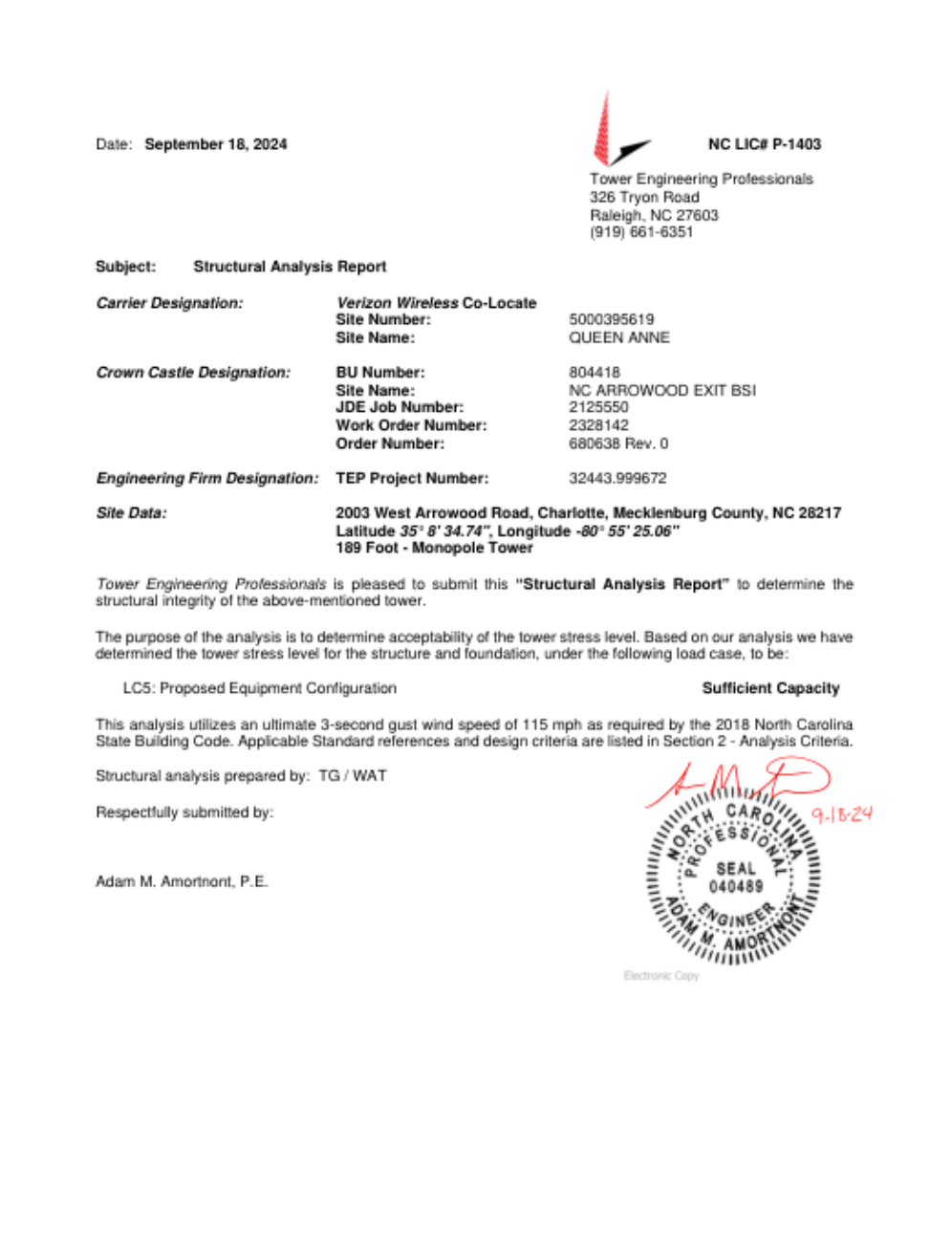
Engage Data Validator to check site documents for conflicts.

Ran (skill name)

Ran (skill name)

Searched for asset “IA 101011 W N Loop Blvd”
The Data Validation run has started and is now in progress.
Run details
- Run: Data Validation - IA 101011 W N Loop Blvd
- Status: Running
- Inputs used: RFDS.pdf and SA.pdf (from the site's data room, matched to asset "SiteID 1234XYZ" / IA 101011 – W N Loop Blvd)
- Carrier: AT&T
Note: the Agent's start form picked up RFDS.pdf and SA.pdf as its site documents (rather than the MA.pdf you attached in chat) — it auto-selected from the workspace's existing site documents for this asset (which also include CD.pdf, Lease.pdf, MA.pdf, and RFDS.pdf). If you want MA.pdf specifically included in the cross-check, let me know and I can start a follow-up run with it added, or you can edit the run's inputs before/after this one completes.
The Data Validation run is now complete.
Data Validation Loop Blvd
13 minutes ago · Attempt 1

Completed


Loop Blvd Validation Report
Document · PDF

Push to Data Library

Download

Details
Re-run


Write a message ...


Nino is AI and can make mistakes, please double check responses.
A completed run inside a conversation. The assistant explains which documents it used.
Step 4
Reviews, again and again
Every engineering iteration triggered another design review, so design and build ran in parallel from here on. One example: I rebuilt the run detail panel after walkthroughs showed that people could not tell inputs from outputs.
The acceptance criteria included that the inputs section shows everything the run was actually given, and that every icon button has a label for screen readers.
Loop Blvd Validation Report
Data Validation · Report


Open canvas

Re-run

Archive


Details
History

Attempt 1 of 1

STATUS

Completed
6 days ago · 6 min 31 seconds

Re-run
INPUTS

Carrier
AT&T

Input_Document_A.pdf


Input_Document_B.pdf


SSC/KS/SSC-10065/T-Mobile_A5G0013A/P-064840/SAQ/Site Acquisition/Lease/5021093_80GHz_251230COMS00007_01052026.pdf

OUTPUTS

Output_Document_A.pdf


Output_Document_B.pdf


Download all outputs as .zip file


AM
Workspace

Agents


Agents
Engage Agent
All status

All Agents

All outputs

All authors


Search


1-10 of 100


25

NAME

Loop Blvd Validation Report
Data Validator · Report
Loop Blvd Validation Report
Data Validator · Report
Loop Blvd Validation Report
Data Validator · Report
Loop Blvd Validation Report
Data Validator · Report
Loop Blvd Validation Report
Data Validator · Report
Loop Blvd Validation Report
Data Validator · Report
Loop Blvd Validation Report
Data Validator · Report
Loop Blvd Validation Report
Data Validator · Report
Loop Blvd Validation Report
Data Validator · Report
Loop Blvd Validation Report
Data Validator · Report
Loop Blvd Validation Report
Data Validator · Report
Loop Blvd Validation Report
Data Validator · Report
Status

Pending

Running · 0:05

Needs review

Completed
Failed
Cancelled

Completed

Completed

Completed

Completed

Completed

Completed
STARTED
-
2 hours ago
2 hours ago
4 hours ago
4 hours ago
4 hours ago
18 hours ago
18 hours ago
18 hours ago
18 hours ago
18 hours ago
18 hours ago
AUTHOR
Henry Smith
Henry Smith
Henry Smith
Deborah Baker
Deborah Baker
Deborah Baker
Xin Li
Xin Li
Xin Li
Xin Li
Xin Li
Xin Li
OUTPUTS
-
-
-
1 / 1 pushed to Data Library
-
-
0 / 1 pushed to Data Library
2 / 2 pushed to Data Library
1 / 1 pushed to Data Library
1 / 2 pushed to Data Library
1 / 1 pushed to Data Library
1 / 1 pushed to Data Library
ACTIONS
-
Cancel

Review and confirm inputs


Open canvas


Open canvas


Open canvas


Open canvas


Open canvas


Open canvas


Open canvas


Run detail after the rebuild: status, inputs and outputs as separate sections.


AM
Workspace


Coworkers
Loop Blvd Mount Analysis


Loop Blvd Mount Analysis

RISA PDF
Antenna Loading
Loading Definition
Next
3D View
Overview
Node Coordinates
100
Member Advanced Data
51
Loading
4
Exceptions
1
3D Mount View
189 nodes · 127 members · 0 antennas

Lines

Sections

Nodes

Supports




Pipe P4
LEGEND


STANDOFF
3

HORIZONTAL
3

HANDRAIL
3

END ANGLE
3

HANDRAIL BRACE
3

GRATE SUPPORT 1
3

GRATE SUPPORT 2
6

PIPE MOUNT
9

RIGID
18

Support / BC node
SELECTION
Click a member, node, or antenna in the scene to inspect it.
Human in the loop canvas for Mount Analysis agent.
Outcome
The platform launched and customers are live on it
A concept leadership built on
The layered model became the architecture of the new platform, and the company chose to migrate every customer to it.
Research that reached the product
Seven customer sessions led to concrete changes before launch, and the findings went to the whole company at an all-hands.
Parity plus improvement
Customers kept everything they relied on in the legacy portal and gained a clearer field model with values they can verify.
5
Customer organisations live on the new platform
6
Agents available at launch
01.10.2026
launch, 3 months after the first concept
What I would do differently
Spend more time writing the PRD and specification before the first build starts. It was written alongside the build due to the required speed, but a shared source of truth from day one is crucial.
Interested in discussing a specific product, interface or collaboration?


Case study · B2B SaaS · AI for critical infrastructure
From data silos to a new platform
I redesigned the information architecture of an AI-assisted platform for telecom infrastructure owners and their engineers. As the product designer I stayed with it through specification, build, customer testing, launch and migration, and took over a number of product ownership responsibilities.
Role
Product designer, later product owner
Timeline
May to November 2026, concept to launch
Team
CEO, Head of Product,
8 engineers and QA
Status
Launched,
customers are live
The product
The client’s software reads the document collections of tower owners: leases, permits, structural analyses. It extracts the values that matter and runs AI agents that produce engineering deliverables such as validation reports and drawings.
Their legacy portal had grown one feature at a time. Documents sat in separate data rooms, the AI tools lived in another area and the data model was hard-coded. The interface was hard to use and required training.
How the work ran
01
Discovery
Pain points from Product, Sales and Customer Success, plus recorded customer calls.
02
Concept and IA
A layered platform model, reviewed every week with the CEO and Head of Product.
03
Specification
28 spec pages as the source of truth for engineering and QA.
04
Build review
A UX audit of the build, five internal walkthroughs, design QA at ticket level.
05
Customer sessions
Seven preview sessions with users from four customers.
06
Launch
Customers moved off the legacy portal. Every engineering iteration still gets a design review.
01 · Information architecture
A complaint about data silos became the architecture of the new platform
The problem
Customers' documents were locked into separate data rooms. Nobody could group documents across rooms, point the assistant at a subset, or get from a document to the AI tool working on it. The data model of the legacy platform was not scalable.
What I worked out
Based on the listed pain points, I designed a layered data model. A structured Data Library holds every document once and the assistant is present on every surface. Agents run on a chosen scope, and their saved outputs return to the Data Library as artifacts.
Data Library
Document Intelligence and Extraction Tools
Assets
Intelligent Fields
Folder A
Intelligent Fields
Folder B
Intelligent Fields
Nino
Prominent entry point, persistent across all surfaces
Agent A Run
(i.e. Structural Analysis)
Agent B Run
(i.e. Data Validation)
Agent C Run
(i.e. Mount Analysis)
Artifact A
(i.e. Structural Analysis)
Agents
All available Agents
Workflows
All available workflows
Runs
All current and past runs
Artifact B
(i.e. Data Validation)
Artifact C
(i.e. Mount Analysis)
Interactive data table, extraction tools, CUSTOM VIEWS
CHAT UI
Conversational layer
Agentic conversations with templated outputs
Saved Artifacts become persistent
High-level platform information architecture presented to leadership during early rounds.
The principle
Documents are stored once in a unified data library. Folders, views, projects, permissions and AI scope are all layers on top.
Decisions made
The CEO pushed for an assistant-first experience, as hundreds of users cannot be trained on a complex interface, whereas everyone knows how to type a question.
I made the assistant the entry point and conversations are private, but runs are surfaced across members (i.e. cross-review is needed). Output stays inside its run until someone saves it as an artifact to the Data Library, which is accessible by the whole organisation.
User A
User B
Data Library
User C
User D
INDIVIDUAL USER
NINO CHATS
Individual conversations are not shared across organization
RUNS
Runs are surfaced across the organization, filterable
ARTIFACTS
Outputs are saved to the data library and with this become accessible across org
Nino
Individual conversations
Agent
Run A Started
Artifact
Artifact A Saved
Artifact
Artifact B Saved
Artifact
Artifact C Saved
Artifact
Artifact D Saved
All runs
Nino
Individual conversations
Agent
Run B Started
Nino
Individual conversations
Agent
Run C Started
Nino
Individual conversations
Agent
Run D Started


Simplified role-based architecture.
What testing changed
In the first build, a run lived inside the conversation that started it. Internal walkthroughs showed that people lost track of their runs that way and reviewers could not find a run someone else had started.
Thus runs became the main agent interface: one list with status, author and outputs, and one clear action per state. A run can be started from a conversation or engaged directly.


Re-run

Download outputs


Archive run


Report a problem with this run


AM
Workspace


Agents


Agents

Engage Agent
All status

All Agents
All outputs
All authors

Search


1-10 of 100


25

NAME

Loop Blvd Validation Report
Data Validation · Report
Loop Blvd Validation Report
Data Validation · Report
Loop Blvd Validation Report
Data Validation · Report
Loop Blvd Validation Report

Data Validation · Report
Loop Blvd Validation Report
Data Validation · Report
Loop Blvd Validation Report
Data Validation · Report
Loop Blvd Validation Report
Data Validation · Report
Loop Blvd Validation Report
Data Validation · Report
Loop Blvd Validation Report
Data Validation · Report
Loop Blvd Validation Report
Data Validation · Report
Loop Blvd Validation Report
Data Validation · Report
Loop Blvd Validation Report
Data Validation · Report
Status

Pending

Running · 0:05

Needs review

Completed

Failed

Cancelled
Completed
Completed
Completed
Completed
Completed
Completed
STARTED
-
2 hours ago
2 hours ago
4 hours ago
4 hours ago
4 hours ago
18 hours ago
18 hours ago
18 hours ago
18 hours ago
18 hours ago
18 hours ago
AUTHOR
Henry Smith
Henry Smith
Henry Smith
Deborah Baker
Deborah Baker
Deborah Baker
Xin Li
Xin Li
Xin Li
Xin Li
Xin Li
Xin Li
OUTPUTS
-
-
-
1 / 1 pushed to Data Library
-
-
0 / 1 pushed to Data Library
2 / 2 pushed to Data Library
1 / 1 pushed to Data Library
1 / 2 pushed to Data Library
1 / 1 pushed to Data Library
1 / 1 pushed to Data Library
ACTIONS

Cancel

Cancel

Review inputs

Open canvas


Re-run
Re-run
Open canvas
Open canvas
Open canvas
Open canvas
Open canvas
Open canvas


Runs as the primary interface, with one action per status.
Result
Leadership committed to building a new platform on this model and migrating every customer to it.
"It really demonstrates design vision and a clear understanding of our market and our users."
Head of Product, after the first concept review
02 · User research
Seven customer sessions before launch, and what we changed afterwards
How I set it up
I planned and ran preview sessions with the people who use the legacy product every day. Each one lasted up to an hour and ran on the customer's own data. I asked for each person's role and current usage beforehand, since a lease administrator and a structural engineer need different sessions.
The platform was still in build, and a lot broke live. The conversations were worth it anyway.
Who took part
Property team lead
Tower owner, about 8,000 sites
Property consents specialist
Tower owner, about 8,000 sites
Engineering manager
Structural engineering firm
VP of IT, two sessions
Tower owner, about 1,850 assets
Real estate administrator
Tower portfolio owner
Integrations developer
Tower portfolio owner
The main finding
No customer was running the full setup. Product value was gated by configuration, and many users had stopped after the first or second layer.
1 · Document classes
2 · Document fields
3 · Site fields
4 · Folders
5 · Agents
Each layer builds on the one below. Agents, the most valuable part, were switched on for one customer in six, and two customers had never heard of them.
What we heard and what was changed
Heard in sessions
Changed in the platform
Cloning a field kept a live link, so later edits overwrote each other.
Duplicate now creates an independent copy.
Field columns appear in no useful order, and saving a field throws you back to the top of the list.
Columns can be reordered and grouped. Lists sort by last updated.
Where in the document did this value come from, and how sure is the system?
Every extracted value shows its source, the reasoning and a confidence indicator.
Setting up fields takes several steps through three areas of the product.
One Configuration area in the main navigation, with standard classes and fields switched on by default.
Our document tags feed the folder checks in our own file system.
Tags carry over unchanged in the migration.


Reprocessing options


Export options

Deduplicate files

Add Intelligent Fields


AM
Workspace


Data Library
All Documents


STANDARD VIEWS

All Documents

Assets

Artifacts
INTELLIGENT FOLDERS

Leases
Projects

All Documents
Actions


Upload
Intelligent Fields · Class A

Status

Filter

Search


1-10 of 100


25

Document Name


Document_A.pdf

Document_B.pdf

Document_C.pdf

Document_D.pdf

Document_E.pdf

Document_F.pdf

Document_F.pdf

Document_F.pdf

Document_F.pdf

Document_F.pdf

Document_F.pdf

Document_F.pdf
Matched site
LAMON2118_Green Drive_1A
LAMON2118_Green Drive_1A
LAMON2118_Green Drive_1A
LAMON2118_Green Drive_1A
LAMON2118_Green Drive_1A
LAMON2118_Green Drive_1A
LAMON2118_Green Drive_1A
LAMON2118_Green Drive_1A
LAMON2118_Green Drive_1B
LAMON2118_Green Drive_1B
LAMON2118_Green Drive_1B
LAMON2118_Green Drive_1B
CLASS
Class A
Class A
Class A
Class A
Class A
Class A
Class A
Class A
Class A
Class A
Class A
Class A
lease_expiry_date

31/03/2041

31/03/2041

30/04/2046
31/03/2041
14/06/2038
14/06/2038
30/09/2035
30/09/2035
01/2044
31/12/2039

NA
28/02/2042
rent_amount
$2,450.00 / month
$2,450.00 / month
$2,523.50 / month
$29,400.00 / year
$1,850.00 / month

$1,850.00
$2,100.00 / month
$2,100.00 / month
$3,200.00
$38,400.00 / year
NA
$3,296.00 / month
tenant_entity
Tower Company Towers LLC
NA
Tower Company Towers LLC
New Cingular Wireless PCS, LLC
T-Mobile Northeast LLC
T-Mobile Northeast LLC
Cellco Partnership
Cellco Partnership
Tower Company
Tower Company Towers LLC
NA
Dish Wireless L.L.C.


Extracted values in the documents table, each with a confidence indicator.
"I like that it's an all inclusive place I could go to, to manage and look at the site information."
Engineering manager, structural engineering firm
03 · Feature design and delivery
Document intelligence feature: parity as the minimum requirement, rebuild and improve
The starting point
An intelligent field is a prompt that reads one value out of a document, such as a rent amount, a lease expiry date or an antenna height. Customers run dozens of them across thousands of documents.
What I added
In the legacy portal, fields were scattered over three areas and showed up in different places. I proposed one place to define fields, a clear model of what each field describes, and results that people can check and correct where they already work.

Company


Dashboard

New conversation

Agents

Data Library
Recents
Compare the RFDS against the structural
Find sites missing a current RFDS
Compare the RFDS against the structural
Data Validation LAMON2118
Compare the RFDS against the structural
Mount Analysis LAMON2118
Compare the RFDS against the structural
Data Validation LAMON2118
Compare the RFDS against the structural
Find sites missing a current RFDS
Mount Analysis LAMON2118
Compare the RFDS against the structural
Data Validation LAMON2118
Compare the RFDS against the structural
Mount Analysis LAMON2118
Compare the RFDS against the structural
Data Validation LAMON2118
Compare the RFDS against the structural

Configuration
AM
Adam Miller
Tower Company

Workspace
Configuration
Data Library

Document classes

Intelligent Fields

Intelligent Folders

Document completeness
AGENTS

Tower drawings
Mount analysis
Intelligent Fields
An intelligent field is one value read out of a document or derived across several. What that value describes may be a document, an asset, or a folder.

Extract fields

Import

Link from catalog

Create field
All
Document
Asset
Folder
Search
Showing 125 Intelligent Fields
FIELD
structure_height_ft
tower_type
lease_commencement_date
rent_escalation_pct
order_date
applicant_entity
antenna_centerline_ft

max_capacity_pct
lease_package_complete
lease_expiry_date
landlord_entity
tenant_entity
renewal_option_count
renewal_notice_days
rent_amount
escalation_frequency
memorandum_recorded
site_id
site_name
latitude
longitude
ground_elevation_ft
wind_speed_mph
ice_thickness_in
carrier_name
DESCRIBES
Asset
Asset
Asset
Asset
Document
Document
Document
Document
Folder
Document
Document
Document
Document
Document
Document
Document
Document
Asset
Asset
Asset
Asset
Document
Document
Document
Document
PROMPT
Read the overall structure height above ground line, in feet, from the site data table.
Read the structure type from the site data table. Use the wording on the sheet.
Extract the date the lease term begins. Return ISO format (YYYY-MM-DD).
Extract the recurring rent increase as a percentage. Do not return one-off increases.
Extract the date the FCC issued this Memorandum Opinion and Order.
Extract the name of the entity whose application this order grants.
Read the antenna centreline height above ground, in feet, for each mounted antenna.
Read the maximum structural capacity used under the proposed loading, as a percentage.
Whether every document the lease package requires has been matched to this asset.
Extract the end date of the current term, before any renewal option is exercised.
Extract the legal name of the party granting the lease, exactly as written.
Extract the legal name of the party taking the lease, exactly as written.
Extract the number of renewal terms the tenant may exercise.
Extract the notice period required to exercise a renewal, in days.
Extract the rent payable at commencement, with its currency and the period it covers.
Extract how often the rent escalates, for example annually or every five years.
Whether a memorandum of lease was recorded against title.
The carrier or owner site identifier used across documents for this asset.
The site name as written on the lease and on the structural report.
Decimal latitude of the structure, to five decimal places.
Decimal longitude of the structure, to five decimal places.
Read the ground elevation above sea level, in feet, from the site data table.
Read the design wind speed used in the analysis, in miles per hour.
Read the design ice thickness used in the analysis, in inches.
Extract the carrier the application or lease is for, exactly as written.
LAST UPDATED
12/01/2026
12/01/2026
12/01/2026
04/02/2025
04/02/2025
04/02/2025
19/03/2025
19/03/2025
19/03/2025
02/04/2025
02/04/2025
02/04/2025
17/04/2025
17/04/2025
06/05/2025
06/05/2025
06/05/2025
21/05/2025
21/05/2025
21/05/2025
09/06/2025
09/06/2025
09/06/2025
23/06/2025
23/06/2025

All three kinds of fields on one page.
One page, three scopes
Document, asset and folder fields share one table. A badge says what each field describes.
Fields as their own objects
Fields used to be unnamed data stored on their owner. My design needed them to be linkable, so engineering changed the data model.
Check, edit, lock
Results sit in the documents table with source and confidence. A value someone corrects is locked, so reprocessing cannot overwrite it.
A decision that went against my first proposal
Based on the user research sessions, we moved forward and defined standard classes and fields. This resulted in the question of what should happen when a customer edits one?
I first proposed overrides per property with version control, so customers would keep receiving our updates. The Head of Product preferred a simpler rule: editing a standard creates a custom copy.
I spelled out the cost before we agreed: The proposed solution is the simpler one, but a customer who edits a standard stops receiving our improvements to it. We dropped version control, and the edit screen now says so in one sentence before the user saves.


AM
Workspace


Configuration


Data Library

Document classes

Intelligent Fields

Intelligent Folders

Document completeness
AGENTS

Tower drawings

Mount analysis

Intelligent Fields
earliest_expiry
Folder field
Define what this field reads out of documents and check the values it produced.

Changes save automatically. Click Extract to update this field's values. Until then, it keeps the values read with the previous prompt.
Field definition
Edit the name and prompt.

Extract
Done
Name
earliest_expiry
Describes
Folder
Folder
The intelligent folder this field is defined on
Site documents / Lease package
Prompt
How the value is read across the documents this folder holds for a site.
Find the earliest date on which any part of the lease arrangement for this site expires.
Read the expiry date from the lease and from every amendment the folder holds for the site. Where an amendment extends or shortens the term, the amended date replaces the original.
Return the date in ISO format (YYYY-MM-DD) and name the document it came from.
Do not return:
• Renewal option dates that have not been exercised
• Expiry dates of agreements that were later terminated


AI rewrite

Undo
Scope
What one value covers.
One value per site, read across every document the folder holds for that site. A site with no documents in the folder has no value.
A banner states the trade-off, when saving and unlinking a standard.
Getting it built correctly
Tickets with acceptance criteria
I wrote the tickets for the frontend team, covering read and edit states to the exact copy.
Answers in the thread
QA and engineers asked about bulk actions, sorting and sharing scope. Answered in the ticket.
Testing every build
I tested each release against the design and sent corrections until they matched.
04 · End-to-end process
One agent, from discovery to a shipped workflow
An agent takes a site's documents and produces an engineering deliverable. Mount analysis is the most demanding one: a licensed engineer stamps and signs the result. This is how one agent moved through the building process.
Step 1
Product discovery
Discovery surfaced two requirements. Engineers need to see every assumption before they put their name on a report. Leadership's worry was adoption: if the agent asks for too much manual input, engineers stay with the analysis tool they already know.
Those two requirements pull in different directions, and the design had to satisfy both.
Requirements I took into design
Fill inputs in for the engineer
Read them from the site's documents and ask only for what is missing.
Show where each value comes from
Every input traces back to a document the engineer can open.
Confirm before generating
A person checks the inputs. Detailed inspection stays available as an advanced option.
Step 2
UX draft
Every agent shares one outer experience, so learning one teaches you the rest. A run starts in two steps. The Start button stays disabled until the required inputs are present, so a long run cannot fail halfway over a missing file.
A run can start from the agent list, from a selection of documents or from a conversation. All three lead to the same run.
Engage an Agent
Hand off multi-step work to an AI Agent. It runs on your workspace files and brings results back for review.

ENGINEERING
Data Validation
Cross-checks values across all documents for a site
IN
OUT
Any asset documents
Validation report · PDF

Report
Start
Structural Model
Runs tower structural analysis against current loading
IN
OUT
Modeling PDF
Model file · ERI

Model
Start
Structural Report
Generate structural report from ERI and RTF files
IN
OUT
ERI file + RTF file
Word report · DOCX + PDF
Report
Start
DESIGN
Tower Drawing
Generates tower engineering drawings
IN
OUT
Tower file + RFDS
Tower drawings · DWG

Drawing
Start
Fiber Drawing
Generates fiber route drawings with GIS merge
IN
OUT
GIS files + route data
Fiber route drawings · DWG
Drawing
Start
Coming soon
Mount Analysis
Performs structural mount analysis for antenna mounts
Pole Load Analyst
Lorem ipsum
Rooftop Drawing
Lorem ipsum
Small Cell / DAS Drawing
Lorem ipsum
QA Package
Lorem ipsum
Site Acquisition Analysis
Lorem ipsum
Lease Administration Package
Lorem ipsum
Title & Survey Analysis
Lorem ipsum
Permission Analysis
Lorem ipsum

Cancel


AM
Workspace

Agents
Agents

Engage Agent
All status

All Agents
All outputs
All authors

Search


1-10 of 100


25

NAME

Loop Blvd Validation Report
Data Validator · Report
Loop Blvd Validation Report
Data Validator · Report
Loop Blvd Validation Report
Data Validator · Report
Loop Blvd Validation Report
Data Validator · Report
Loop Blvd Validation Report
Data Validator · Report
Loop Blvd Validation Report
Data Validator · Report
Loop Blvd Validation Report
Data Validator · Report
Loop Blvd Validation Report
Data Validator · Report
Loop Blvd Validation Report
Data Validator · Report
Loop Blvd Validation Report
Data Validator · Report
Loop Blvd Validation Report
Data Validator · Report
Loop Blvd Validation Report
Data Validator · Report
Status

Pending

Running · 0:05

Needs review

Completed

Failed

Cancelled
Completed
Completed
Completed
Completed
Completed
Completed
OUTPUTS
-
-
-
1 file
-
-
1 file
1 file
1 file
1 file
1 file
1 file
STARTED
-
2 hours ago
2 hours ago
4 hours ago
4 hours ago
4 hours ago
18 hours ago
18 hours ago
18 hours ago
18 hours ago
18 hours ago
18 hours ago
ACTIONS
-

Cancel

Review and confirm inputs

Open canvas

Push to Data Library


-
-
Open canvas
Push to Data Library
Open canvas
Push to Data Library
Open canvas
Push to Data Library
Open canvas
Push to Data Library
Open canvas
Push to Data Library
Open canvas
Push to Data Library


Starting a run. The catalogue behind it lists each agent with its inputs and output type.
Step 3
Implementation
Engineering found that a single large agent was unreliable and split the work into modelling, loading and reporting, chained by an orchestrator. I adjusted the design so that three agents still read as one job to the engineer.
In a conversation, the assistant states which inputs it picked up and why. The finished run appears as a card with the deliverable, ready to be pushed to the Data Library.

Company


Dashboard

New conversation
Agents

Data Library
Recents

Structural Analysis LAMON2118
Compare the RFDS against the structural
Find sites missing a current RFDS
Compare the RFDS against the structural
Data Validation LAMON2118
Compare the RFDS against the structural
Mount Analysis LAMON2118
Compare the RFDS against the structural
Data Validation LAMON2118
Compare the RFDS against the structural
Find sites missing a current RFDS
Mount Analysis LAMON2118
Compare the RFDS against the structural
Data Validation LAMON2118
Compare the RFDS against the structural
Mount Analysis LAMON2118
Compare the RFDS against the structural
Data Validation LAMON2118
Compare the RFDS against the structural

Configuration
AM
Adam Miller
Tower Company

Workspace
Data Validator Check for Site Documents
Engage Data Validator to check site documents for conflicts.

Ran (skill name)
Ran (skill name)

Searched for asset “IA 101011 W N Loop Blvd”
The Data Validation run has started and is now in progress.
Run details
- Run: Data Validation - IA 101011 W N Loop Blvd
- Status: Running
- Inputs used: RFDS.pdf and SA.pdf (from the site's data room, matched to asset "SiteID 1234XYZ" / IA 101011 – W N Loop Blvd)
- Carrier: AT&T
Note: the Agent's start form picked up RFDS.pdf and SA.pdf as its site documents (rather than the MA.pdf you attached in chat) — it auto-selected from the workspace's existing site documents for this asset (which also include CD.pdf, Lease.pdf, MA.pdf, and RFDS.pdf). If you want MA.pdf specifically included in the cross-check, let me know and I can start a follow-up run with it added, or you can edit the run's inputs before/after this one completes.
The Data Validation run is now complete.
Data Validation Loop Blvd
13 minutes ago · Attempt 1

Completed


Loop Blvd Validation Report
Document · PDF
Push to Data Library

Download

Details
Re-run


Write a message ...


Nino is AI and can make mistakes, please double check responses.
A completed run inside a conversation. The assistant explains which documents it used.
Step 4
Reviews, again and again
Every engineering iteration triggered another design review, so design and build ran in parallel from here on. One example: I rebuilt the run detail panel after walkthroughs showed that people could not tell inputs from outputs.
The acceptance criteria included that the inputs section shows everything the run was actually given, and that every icon button has a label for screen readers.
Loop Blvd Validation Report
Data Validation · Report

Open canvas

Re-run

Archive


Details
History

Attempt 1 of 1

STATUS
Completed
6 days ago · 6 min 31 seconds
Re-run
INPUTS

Carrier
AT&T

Input_Document_A.pdf


Input_Document_B.pdf

SSC/KS/SSC-10065/T-Mobile_A5G0013A/P-064840/SAQ/Site Acquisition/Lease/5021093_80GHz_251230COMS00007_01052026.pdf
OUTPUTS

Output_Document_A.pdf

Output_Document_B.pdf

Download all outputs as .zip file
AM
Workspace
Agents
Agents
Engage Agent
All status
All Agents
All outputs
All authors
Search
1-10 of 100
25
NAME
Loop Blvd Validation Report
Data Validator · Report
Loop Blvd Validation Report
Data Validator · Report
Loop Blvd Validation Report
Data Validator · Report
Loop Blvd Validation Report
Data Validator · Report
Loop Blvd Validation Report
Data Validator · Report
Loop Blvd Validation Report
Data Validator · Report
Loop Blvd Validation Report
Data Validator · Report
Loop Blvd Validation Report
Data Validator · Report
Loop Blvd Validation Report
Data Validator · Report
Loop Blvd Validation Report
Data Validator · Report
Loop Blvd Validation Report
Data Validator · Report
Loop Blvd Validation Report
Data Validator · Report
Status
Pending
Running · 0:05
Needs review
Completed
Failed
Cancelled
Completed
Completed
Completed
Completed
Completed
Completed
STARTED
-
2 hours ago
2 hours ago
4 hours ago
4 hours ago
4 hours ago
18 hours ago
18 hours ago
18 hours ago
18 hours ago
18 hours ago
18 hours ago
AUTHOR
Henry Smith
Henry Smith
Henry Smith
Deborah Baker
Deborah Baker
Deborah Baker
Xin Li
Xin Li
Xin Li
Xin Li
Xin Li
Xin Li
OUTPUTS
-
-
-
1 / 1 pushed to Data Library
-
-
0 / 1 pushed to Data Library
2 / 2 pushed to Data Library
1 / 1 pushed to Data Library
1 / 2 pushed to Data Library
1 / 1 pushed to Data Library
1 / 1 pushed to Data Library
ACTIONS
-
Cancel
Review and confirm inputs
Open canvas
Open canvas
Open canvas
Open canvas
Open canvas
Open canvas
Open canvas


Run detail after the rebuild: status, inputs and outputs as separate sections.


AM
Workspace


Coworkers
Loop Blvd Mount Analysis


Loop Blvd Mount Analysis

RISA PDF
Antenna Loading
Loading Definition
Next
3D View
Overview
Node Coordinates
100
Member Advanced Data
51
Loading
4
Exceptions
1
3D Mount View
189 nodes · 127 members · 0 antennas

Lines

Sections

Nodes

Supports


Pipe P4
LEGEND


STANDOFF
3

HORIZONTAL
3

HANDRAIL
3

END ANGLE
3

HANDRAIL BRACE
3

GRATE SUPPORT 1
3

GRATE SUPPORT 2
6

PIPE MOUNT
9

RIGID
18

Support / BC node
SELECTION
Click a member, node, or antenna in the scene to inspect it.
Human in the loop canvas for Mount Analysis agent.
Outcome
The platform launched and customers are live on it
A concept leadership built on
The layered model became the architecture of the new platform, and the company chose to migrate every customer to it.
Research that reached the product
Seven customer sessions led to concrete changes before launch, and the findings went to the whole company at an all-hands.
Parity plus improvement
Customers kept everything they relied on in the legacy portal and gained a clearer field model with values they can verify.
5
Customer organisations live on the new platform
6
Agents available at launch
01.10.2026
launch, 3 months after the first concept
What I would do differently
Spend more time writing the PRD and specification before the first build starts. It was written alongside the build due to the required speed, but a shared source of truth from day one is crucial.
Interested in discussing a specific product, interface or collaboration?